Bespoke Beat
Management
Tool
Vault is a music library manager made for Artists & Producers. Build pitch decks, group versions, find anything in seconds. Less time searching, more time creating.
macOS & Windows · free trial · no account required
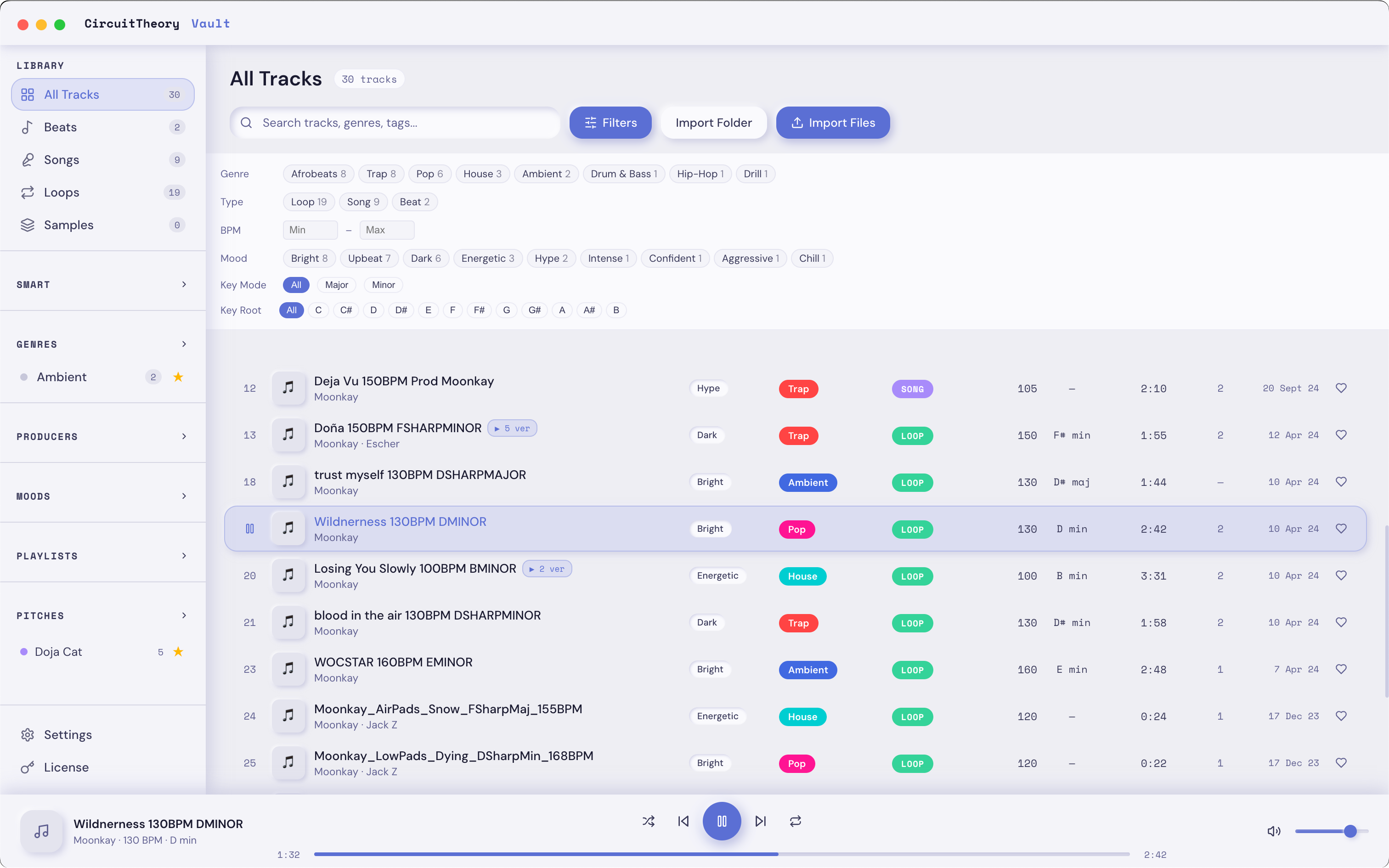
Instant Search
Find any track in milliseconds. Search by title, genre, BPM, key, mood or producer across your entire library.
Custom Tagging
Create your own genres and moods. Drag and Drop multiple tracks at a time to batch-assign metadata instantly.
Version Tracking
Group multiple versions of the same beat automatically, easily track changes making sure you're sharing your latest work.
Pitches
Build current track lists for clients or sessions. Combine filters to get recommendations and filter out the fluff.
Easy Export
Export any playlists to Dropbox/Google Drive with the click of a button.
Themes
Six beautiful themes — Cloud, Lavender, Blush, Midnight, Forest, Ember — to match your setup.
From folder to organised
in under five minutes
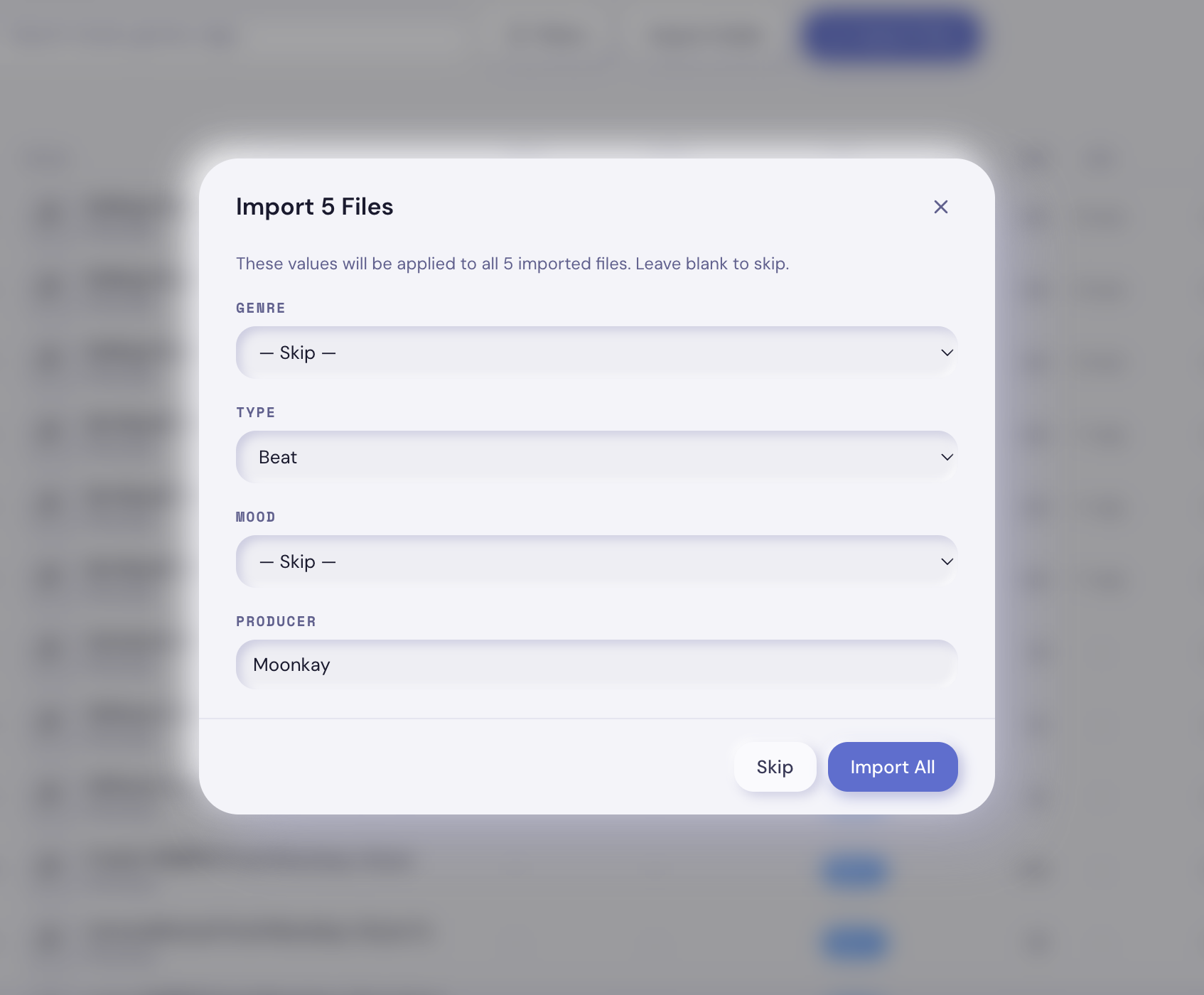
Drop a folder
Vault scans your tracks for BPMs and Keys in the title and fills in any existing metadata automatically. Set any Genres, Moods, Producers or Types from an opening screen.
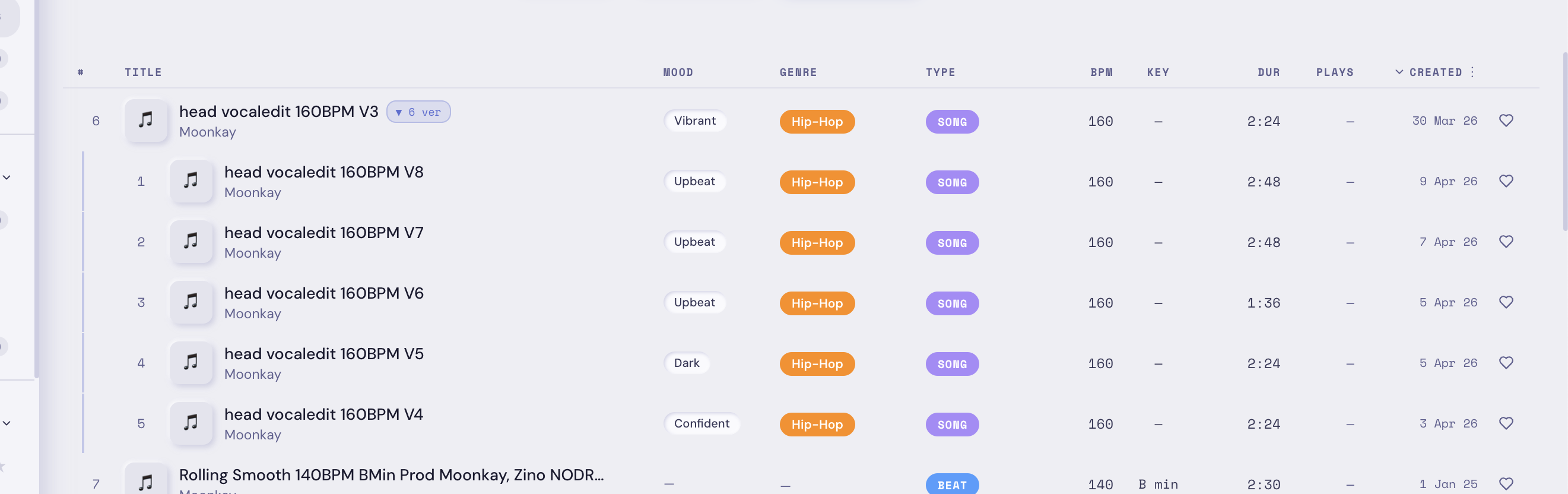
Manage Versions
Always be on top of edits and updates to tracks you've made. Make sure you're sending out your best work.
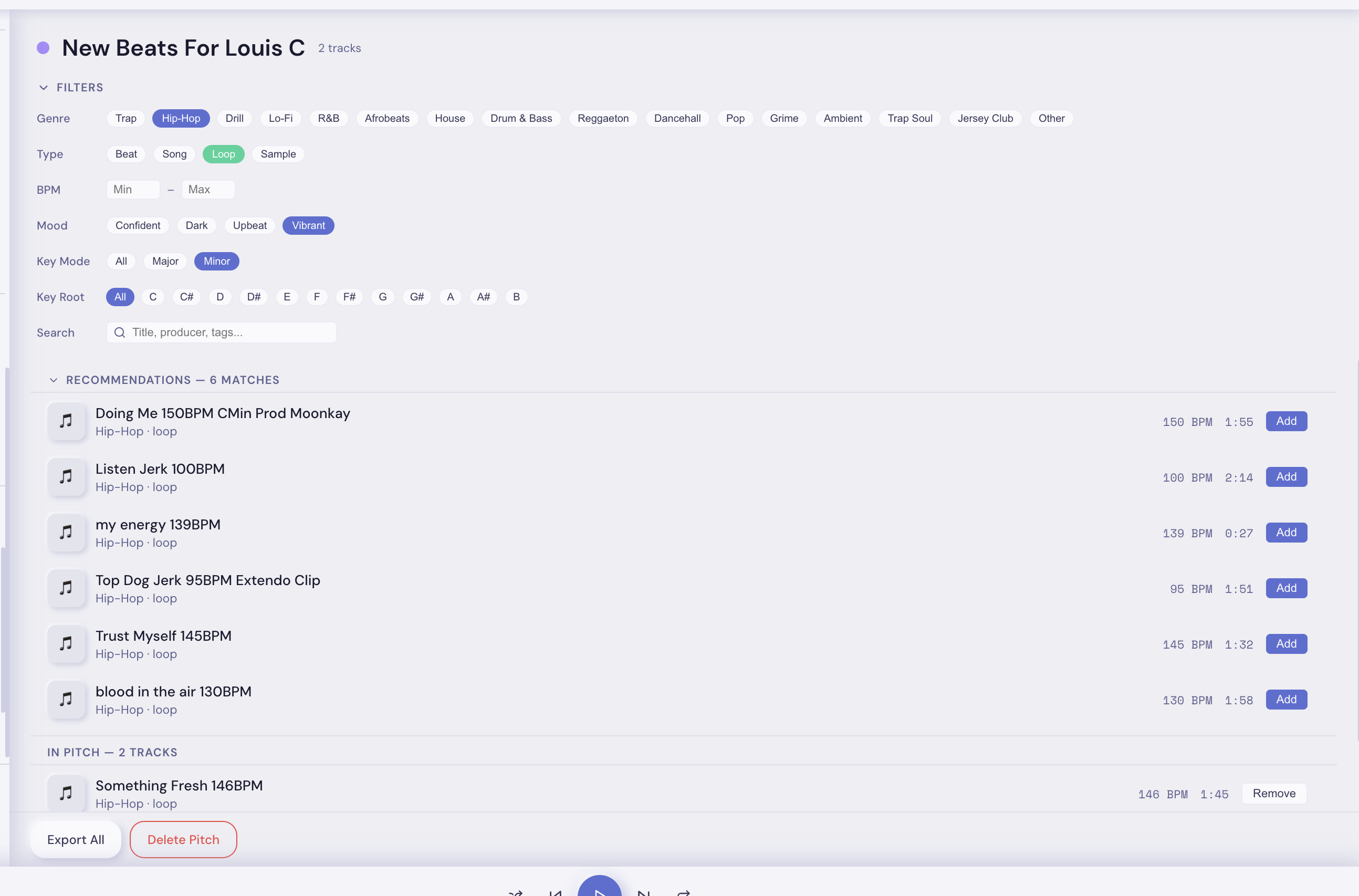
Pitch
Build a pitch for artists or businesses you're working with. Filter by vibe and export the selection to a folder in one click.
Get Vault
One-time payment. No subscription. Available now for macOS and Windows.
- Up to 50 tracks
- Playlists & pitch decks
- All themes
- Up to 200 tracks
- Unlimited tracks
- Priority support
- Up to 200 tracks
- Playlists & pitch decks
- All themes
- Lifetime updates
- Unlimited tracks
- Priority support
- Unlimited tracks
- Playlists & pitch decks
- All themes
- Lifetime updates
- Priority support
all prices ex. VAT · one-time payment · secure checkout via stripe · receipt on purchase
System Requirements
Apple Silicon & Intel native
Installer or portable .exe
Database stored in user data folder
FAQ
Common questions answered. Still stuck? Email us.
Download the .dmg from the Downloads page. Open it, drag Vault into Applications, then double-click to launch. On first open macOS may block it — right-click → Open to bypass Gatekeeper. This is only needed once since Vault is distributed outside the Mac App Store.
Download Vault-Setup.exe from the Downloads page and run it. Windows may show a SmartScreen warning — click "More info" then "Run anyway". This is normal for apps distributed outside the Microsoft Store. Once installed, Vault updates itself automatically. Alternatively, use the portable Vault.exe which requires no installation at all.
No. Your database is stored separately from the app and is never touched during updates. On macOS it lives in ~/Library/Application Support/Vault/, on Windows in %APPDATA%\Vault\. All your tracks, playlists, pitches, custom genres, moods and metadata are untouched. Vault also runs automatic database migrations on startup to handle any schema changes.
No. Vault references your audio files wherever they live on your drive — it never moves, copies or modifies them. The only exception is Export to Folder, which copies selected files to a destination you choose.
A Pitch Deck is a curated selection of tracks you build for a specific client, sync placement or session. Set genre, BPM and mood filters and Vault surfaces recommendations from your library. Add what you want, then export the whole deck to a folder with one click — ready to send.
A Vault license covers up to 2 machines — any mix of Mac and Windows. If you need to move to a new computer, use the Deactivate option in Settings → License to free your slot, then enter your key on the new machine. Need more activations or stuck? Email support@circuit-theory.com and we'll sort it out.
Open Vault → click the gear icon (Settings) → License tab → paste your key and click Activate. The app will contact the CircuitTheory license server to validate and bind your key to this machine. An internet connection is required for first activation only.
Email support@circuit-theory.com with a description of the problem and your macOS version. Screenshots or a screen recording are always helpful. We aim to respond within 48 hours.
Made by Moonkay
Vault started as a personal tool for me to manage the hundreds of beats I've produced, edited and collab'd on over the years.
I've had too many times where I find a random song I made years ago and think "why did I never do anything with this". I purposely built Vault as a way to stay on top of your art and make the act of managing it all a lot less encumbering.
Vault is the start of our journey at CircuitTheory, and I hope to bring you guys more apps over the coming months and years.
Privacy Policy
Last updated: April 2026
This Privacy Policy explains how CircuitTheory ("we", "us", "our") collects, uses, and protects your personal data when you use our website at circuit-theory.com or our software product Vault. We are committed to protecting your privacy in accordance with the UK General Data Protection Regulation (UK GDPR) and the Data Protection Act 2018.
The data controller is: CircuitTheory, contact: hello@circuit-theory.com
1. What Data We Collect
We may collect the following personal data:
- Email address — when you claim a free copy of Vault, purchase a license, or contact us.
- Payment data — processed securely by Stripe. We do not store your card details; Stripe acts as an independent data controller for payment processing.
- Machine identifier — a hashed, non-reversible device ID used solely to bind a license key to one computer. This cannot identify you personally.
- Communication data — any information you voluntarily provide when contacting us for support.
We do not collect your audio files, track titles, library metadata, or any other content stored within the Vault application. All library data remains on your device.
2. How We Use Your Data
We process your personal data on the following legal bases:
- Performance of a contract — to create your account, deliver your license key, and provide product support.
- Legitimate interests — to send transactional emails (e.g. receipt, license delivery, account notifications) and to improve our products.
- Consent — to send you marketing emails about Vault updates, new products, and offers from CircuitTheory. You can withdraw this consent at any time by clicking "unsubscribe" in any marketing email, or by emailing us at hello@circuit-theory.com.
3. Marketing Communications
If you opt in during the free download or account registration process, we may send you occasional emails about:
- New versions and updates to Vault
- New products from CircuitTheory
- Promotional offers and early access opportunities
We will only send marketing communications where you have given explicit consent. You can unsubscribe at any time using the link in any email we send, or by contacting us at hello@circuit-theory.com. Withdrawing consent does not affect any other aspect of your account or license.
4. Data Sharing
We do not sell, rent, or share your personal data with third parties for their marketing purposes. We may share data with the following trusted service providers, solely to operate our service:
- Stripe — payment processing. Stripe's privacy policy applies to payment data: stripe.com/gb/privacy.
- GitHub — software distribution. Downloads are served via GitHub releases. GitHub's privacy policy applies to download traffic.
- Email service provider — used to send transactional and (where consented) marketing emails on our behalf.
All service providers are contractually required to handle your data in accordance with UK GDPR.
5. Data Retention
We retain your email address and account information for as long as your account is active, or as needed to provide services. If you request deletion of your account, we will delete your personal data within 30 days, except where we are required to retain it for legal or accounting purposes (e.g. records of purchases).
6. Your Rights
Under UK GDPR you have the right to:
- Access — request a copy of the personal data we hold about you.
- Rectification — ask us to correct inaccurate data.
- Erasure — ask us to delete your personal data ("right to be forgotten").
- Restriction — ask us to limit how we process your data.
- Portability — receive your data in a structured, machine-readable format.
- Object — object to processing based on legitimate interests or direct marketing.
- Withdraw consent — where processing is based on consent, withdraw it at any time without affecting prior lawful processing.
To exercise any of these rights, email us at hello@circuit-theory.com. We will respond within one calendar month.
You also have the right to lodge a complaint with the UK Information Commissioner's Office (ICO) at ico.org.uk if you believe we have not handled your data correctly.
7. Cookies and Tracking
Our website does not currently use tracking cookies or third-party analytics. If this changes, we will update this policy and, where required, obtain your consent.
8. Data Security
We take reasonable technical and organisational measures to protect your personal data from unauthorised access, loss, or disclosure. All API communications use HTTPS encryption. Payment data is handled exclusively by Stripe and never passes through our servers.
9. Changes to This Policy
We may update this Privacy Policy from time to time. The "Last updated" date at the top of this page will reflect any changes. Continued use of our website or software after changes constitutes acceptance of the updated policy.
10. Contact
For any privacy-related questions or to exercise your rights, contact us at hello@circuit-theory.com.
End-User License Agreement
Last updated: April 2026
This End-User License Agreement ("Agreement") is a legal agreement between you ("User") and CircuitTheory ("we", "us", "our") for the use of Vault ("Software"). By installing or using the Software you agree to be bound by this Agreement. If you do not agree, do not install or use the Software.
1. Grant of License
Subject to the terms of this Agreement and payment of the applicable fee, CircuitTheory grants you a personal, non-exclusive, non-transferable license to install and use one copy of the Software on one (1) computer that you own or control.
Trial users may use the Software free of charge subject to the feature restrictions stated within the Software.
2. License Tiers
The Software is available under the following license tiers, each with different feature entitlements as described on the CircuitTheory website:
- Trial — Free, limited to 50 tracks. No purchase required.
- Basic — One-time purchase. Limited to 200 tracks. Single machine.
- Pro — One-time purchase. Unlimited tracks. Single machine.
All paid licenses are permanent — there are no recurring fees or subscription renewals. You may use the Software indefinitely on the single machine you have activated it on.
3. Restrictions
You may not:
- Copy, share, sell, sublicense, or transfer your license key to another person;
- Install or activate the Software on more than one machine simultaneously using the same license key;
- Reverse engineer, decompile, disassemble, or attempt to derive the source code of the Software;
- Modify, adapt, translate, or create derivative works based on the Software;
- Remove or alter any proprietary notices, labels, or marks on the Software;
- Use the Software for any unlawful purpose or in violation of any applicable law or regulation.
4. Machine Transfers
You may transfer your license to a new machine by deactivating it within the Software (Settings → License → Deactivate on this machine). This frees your activation slot so the key can be entered on another computer. If you are unable to deactivate (for example, due to hardware failure), contact support@circuit-theory.com and we will manually release the activation.
5. Upgrades
If you purchase an upgrade (e.g. Basic to Pro), your previous license key will be deactivated automatically and a new key issued. The original key will no longer function.
6. Ownership
The Software is licensed, not sold. CircuitTheory retains all intellectual property rights in and to the Software, including all updates and modifications. This Agreement does not grant you any rights to trademarks, service marks, or trade names of CircuitTheory.
7. Updates
CircuitTheory may, at its discretion, provide updates, bug fixes, or new versions of the Software. There is no obligation to provide updates. Updates, if provided, will be subject to this Agreement unless accompanied by a new agreement.
8. Data and Privacy
The Software stores your music library data locally on your machine. CircuitTheory does not collect, transmit, or access your personal music files. Your email address is collected when you claim a free copy or make a purchase, for the purpose of account creation, license delivery, and product support.
Where you have given explicit consent, we may also send you marketing emails about Vault updates and new products from CircuitTheory. You can withdraw this consent at any time. Full details are set out in our Privacy Policy.
License activation requires an internet connection to verify your key with our servers. The only information transmitted is a hashed machine identifier and your license key.
9. Disclaimer of Warranties
The Software is provided "as is" without warranty of any kind, express or implied, including but not limited to the warranties of merchantability, fitness for a particular purpose, and non-infringement. CircuitTheory does not warrant that the Software will be uninterrupted, error-free, or free of viruses or other harmful components.
10. Limitation of Liability
To the maximum extent permitted by applicable law, CircuitTheory shall not be liable for any indirect, incidental, special, consequential, or punitive damages, or any loss of data, profits, or goodwill, arising out of or in connection with your use of the Software, even if CircuitTheory has been advised of the possibility of such damages.
CircuitTheory's total liability to you for any claims arising under this Agreement shall not exceed the amount you paid for the Software.
11. Termination
This Agreement is effective until terminated. Your rights under this Agreement will terminate automatically if you fail to comply with any of its terms. Upon termination you must cease all use of the Software and destroy all copies in your possession. Sections 6, 9, 10, and 12 survive termination.
12. Governing Law
This Agreement is governed by and construed in accordance with the laws of England and Wales. Any disputes arising under this Agreement shall be subject to the exclusive jurisdiction of the courts of England and Wales.
13. Contact
For any questions about this Agreement, contact us at support@circuit-theory.com.